
When a HiMCM team submits its solution, judges read a polished PDF. They do not see the messy backend of scripts, data folders, and late-night debugging sessions. However, if the writer or modeler cannot independently verify a key figure from the code output, the paper’s credibility collapses during internal review. A common failure mode is ‘it works on my machine’: the coder runs a simulation, gets a result, pastes it into the draft, but when a teammate tries to reproduce it using the same files, they get a different number. This discrepancy leads to inconsistent figures, unexplainable sensitivity analysis results, and a final paper that lacks internal coherence.
HiMCM Reproducibility is not about academic publishing standards; it is about team operational stability. It ensures that every number in your summary sheet and body text can be traced back to a specific script execution with specific inputs. If you are preparing for the November contest window, establishing a reproducible workflow now prevents chaos later. This guide outlines a concrete protocol for ensuring that non-coders can rebuild your results, focusing on data isolation, seed locking, and standardized entry points.
The Three Pillars of Reproducibility
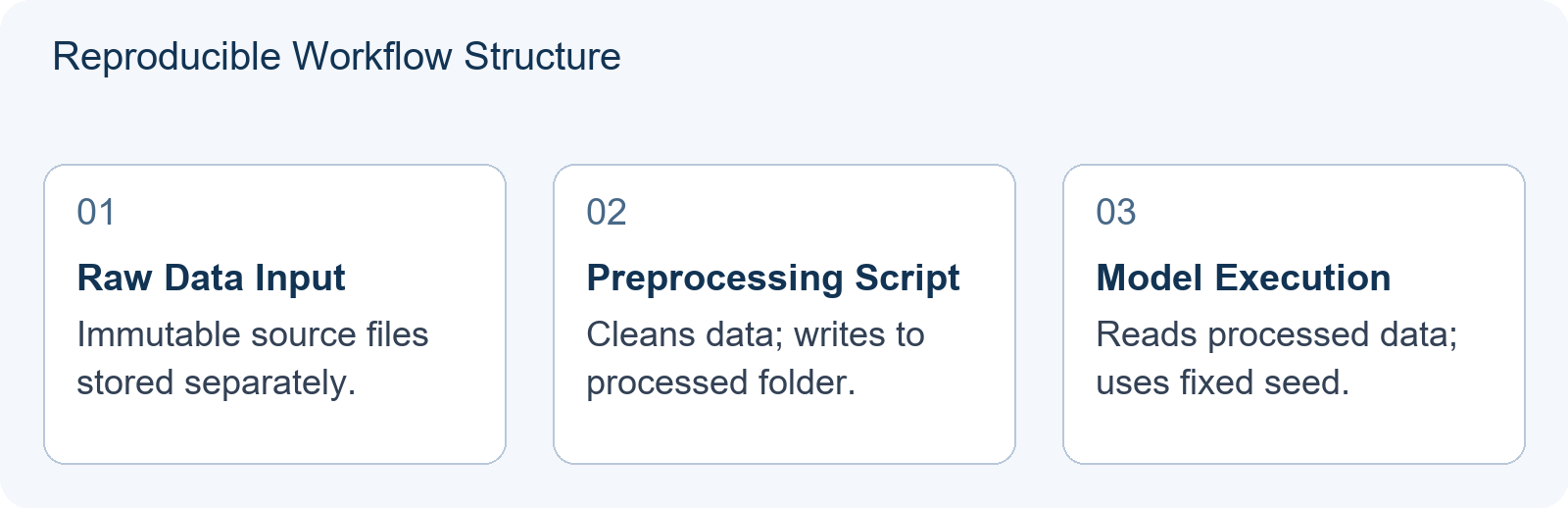
To make code outputs stable and verifiable by teammates who may not be expert programmers, you must address three technical areas: Data Isolation, Seed Locking, and Entry Points.
1. Data Isolation: Raw vs. Processed
A common error is modifying raw data directly in the script. If the coder cleans a dataset, removes outliers, or fills missing values inside the main modeling script, the original state is lost. When the modeler wants to test a different cleaning assumption, they cannot revert to the raw state without asking the coder to re-download the source. Worse, the writer may quote a result that depends on an undocumented edit made hours earlier.
Protocol: Create two distinct directories: /data/raw and /data/processed. Scripts should never write to /data/raw. Instead, a dedicated preprocessing script reads from /raw, applies transformations, and writes to /processed. The modeling script then reads exclusively from /processed. This separation allows any team member to inspect the transformation logic independently. It also makes it possible to compare two preprocessing choices without destroying the original evidence.
Add a small manifest file, such as data_manifest.md, that records where the raw file came from, when it was downloaded or received, and what the preprocessing script does. If the raw file is small, keep a checksum. If it is large, record its size and source. The goal is not bureaucracy; it is so that a teammate can answer ‘which input produced this number?’ in under two minutes.
2. Seed Locking: Controlling Randomness
Many HiMCM models involve stochastic elements: Monte Carlo simulations, random initialization for neural networks, sampling from distributions, or genetic algorithms. If the random seed is not fixed, running the same script twice yields different results. This undermines sensitivity analysis because you cannot distinguish between changes caused by parameter adjustments and random noise. It also makes internal review painful, because the writer cannot tell whether a revised number reflects a corrected model or simply a different random draw.
Protocol: Every script that uses randomness must explicitly set a seed at the very beginning. In Python, this looks like numpy.random.seed(42) or random.seed(42). For MATLAB, use rng(42). If your workflow uses multiple libraries, set seeds for each library that draws random numbers. Document this seed value in the script header and in the output log. If you need multiple runs for statistical confidence, increment the seed systematically, for example seed = base_seed + run_id, rather than leaving it undefined.
Do not rely on a default seed or system time. A teammate who runs the script on another machine with the same inputs and environment should see the same baseline result. If your model intentionally uses randomness to test robustness, then the randomness should be part of a designed experiment, not an accident. Save the list of seeds used for each scenario so the writer can describe the experiment honestly.
3. Standardized Entry Points
Complex projects often have dozens of scripts. A teammate does not know which one to run first. If they run the wrong script, they might overwrite critical intermediate files or fail to generate the necessary inputs for the next step. The coder may understand the pipeline, but the writer or modeler should not need to reverse-engineer it during the contest.
Protocol: Create a single master script or shell command, such as run.sh or main.py, that executes the entire pipeline in the correct order. This entry point should accept minimal arguments, such as problem choice or scenario ID, and handle all dependencies internally. If a teammate wants to reproduce Figure 3, they should be able to run python main.py --scenario=baseline. They do not need to know the internal architecture of the five sub-modules involved.
The entry point should also print or save a short run log. The log should include the scenario name, the seed, the input file paths, the output file paths, and a timestamp. That log becomes the bridge between code and paper. When the writer asks ‘where did this table come from?’, the coder can point to a specific log rather than trying to remember.
Teaching Illustration: The Failed Handover
Note: This is a hypothetical teaching example to illustrate common pitfalls, not an actual contest case study.
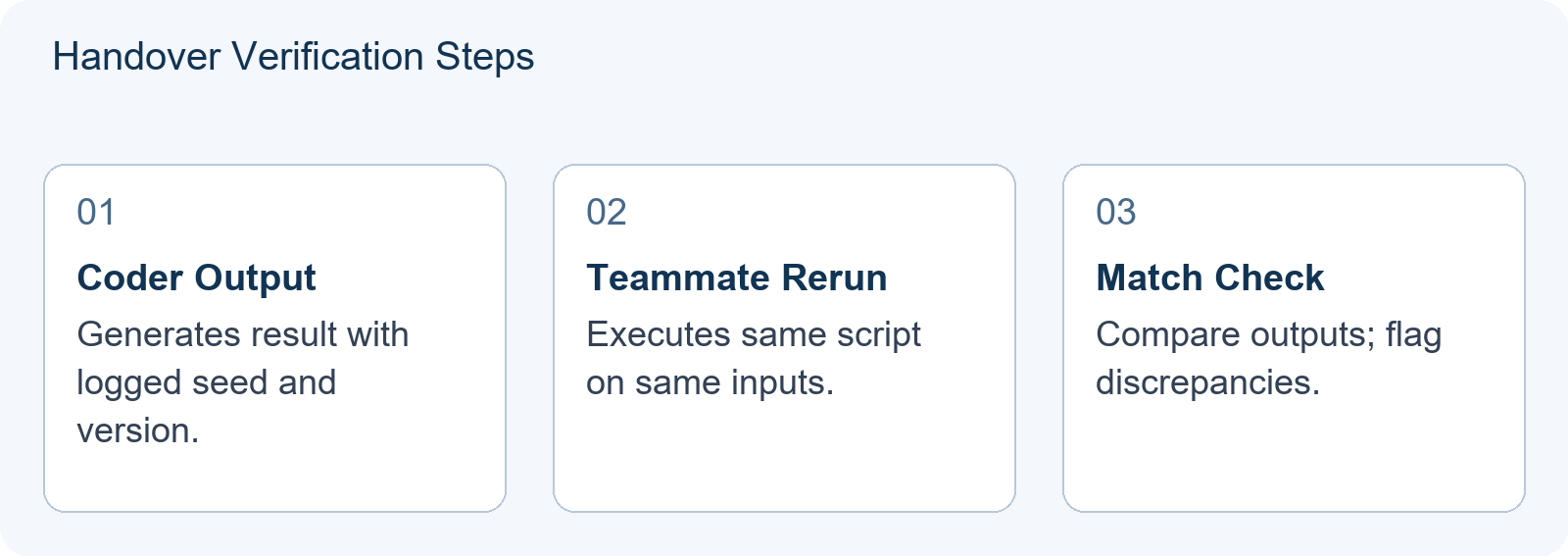
Imagine a team working on a traffic flow optimization problem. The coder, Alex, develops a genetic algorithm to minimize congestion. He runs the script, gets an optimal route cost of 150, and sends the CSV output to Jamie, the writer. Jamie includes this figure in the draft.
Later, the modeler, Sam, wants to test sensitivity to fuel prices. She opens Alex’s folder, finds optimize.py, and runs it. But she gets a cost of 165. Why?
- Error 1: Unseeded randomness. Alex did not set a random seed. The genetic algorithm initialized populations differently each time.
- Error 2: Hidden dependencies. Alex had manually edited
traffic_data.csvto remove a faulty sensor reading before running the script. Sam used the original raw file. - Error 3: Version mismatch. Alex was using a beta version of a library that Sam had not installed.
This mismatch forces the team to stop writing and debug code, wasting precious contest hours. The fix requires strict adherence to the pillars above: locked seeds, isolated data processing, and documented environment requirements. Notice that the problem is not that Alex is a bad coder. The problem is that the handover was not designed for a non-coder to rebuild the result.
The Handover Checklist
Before sending any code output to the writer or modeler, the coder must complete a handover checklist. This ensures the recipient can rebuild the result without assistance.
| Checklist Item | Action Required | Why It Matters |
|---|---|---|
| Seed Verification | Confirm the random seed is hardcoded and visible in the script header. | Helps produce identical numerical outputs when inputs and environment match. |
| Data Path Clarity | Ensure input files are referenced via relative paths, such as ./data/input.csv. |
Prevents errors when moving folders between computers. |
| Dependency List | Provide a requirements.txt or list of required libraries with versions. |
Helps align the software environment with the coder’s. |
| Entry Point Documentation | Write a comment block explaining exactly how to run the script to reproduce the specific figure. | Reduces cognitive load for non-coders. |
| Output Validation | Include a checksum or expected value range for the primary output metric. | Allows immediate detection of reproduction failures. |
If any item fails, the result is considered unverified and should not be included in the draft until resolved. This discipline aligns with HiMCM Model Validation: Test Predictions on Information You Did Not Fit, where predictions must be tested against information not used in fitting.
Version Control Basics for Teams
You do not need complex Git workflows to achieve reproducibility, but you do need version awareness. During the intense 14-day window, files change rapidly. Without tracking, you might lose the version of the script that produced the accepted baseline result.
Simple Folder Snapshots: At the end of each day, copy the entire project folder to a backup directory named backup_day_01, backup_day_02, and so on. This is crude but effective for small teams. Label the snapshot with a short note: what changed, what result was verified, and who verified it.
Git for Structure: If your team has experience, use Git. Commit frequently with descriptive messages like ‘Fixed seed for Scenario B’ or ‘Updated preprocessing script.’ Branching can help isolate experimental models from the main submission path. Ensure that large data files are ignored by Git using .gitignore, but document where these files are stored externally. A commit that cannot be run by a teammate is not a reproducible commit.
Regardless of the method, the key is traceability. You must be able to answer: ‘Which version of the code produced this table?’ If you cannot answer this, your HiMCM Sensitivity Analysis: Change One Assumption Without Losing the Decision is suspect.
Debugging Discrepancies
Even with protocols, mismatches occur. When a teammate reports a different result, follow this diagnostic sequence:
- Check the environment: Are both users running the same Python or MATLAB version? Are library versions identical? Use virtual environments to enforce consistency.
- Verify inputs: Compare the checksum, hash, or file size of the input data files. If they differ, the preprocessing step failed or was skipped.
- Inspect seeds: Confirm the seed values match. If the script uses system time as a default seed, override it explicitly.
- Trace intermediate outputs: Add print statements or save intermediate arrays to disk. Run both versions and compare the first point of divergence. This isolates whether the error is in data loading, initial setup, or the core algorithm.
This process mirrors the modelling decision chain described in Hanlin’s HiMCM preparation material: deconstruct the problem, define variables and assumptions, choose a model family, validate and test sensitivity, then build a defensible argument. Reproducibility is the mechanical backbone of that defense. It prevents the team from arguing about numbers that were never properly generated.
Conclusion: Credible Sensitivity Analysis
Reproducible code transforms your paper from a collection of assertions into a defensible argument. A sensitivity analysis is more persuasive when the reader can see how robust your conclusion is. If your team cannot even agree on the baseline numbers due to coding inconsistencies, the sensitivity analysis appears arbitrary.
By implementing data isolation, seed locking, and clear entry points, you empower every team member to contribute to verification. The writer can check if changing a parameter alters the recommendation. The modeler can test alternative assumptions without waiting for the coder. This collaborative efficiency is crucial during the compressed timeline of the contest.
As you finalize your The HiMCM Toolchain: What Your Team Should Install, Learn and Standardise Before November, prioritize reproducibility over speed. A fast but unstable model will cause delays later. A slightly slower but fully reproducible pipeline ensures that your final submission is coherent, verified, and ready for the summary sheet.
Frequently Asked Questions
Do I need to submit my code to COMAP?
Hanlin’s 2026 HiMCM material notes that programs, software, databases, and other files should not be included in the solution because they are not used in the judging process. Your team still needs to reproduce results internally to ensure accuracy and internal consistency.
What if my teammate does not know Python?
The coder should provide a simple entry point, such as a batch file or a single script, that requires no coding knowledge to run. The teammate just needs to execute the command and observe the output, verifying it matches the documented expected value.
How do I handle different operating systems?
Use relative paths for file references instead of absolute paths such as C:/Users/Name/. Avoid OS-specific commands in scripts. Test the workflow on both Windows and macOS or Linux if possible before the contest begins.