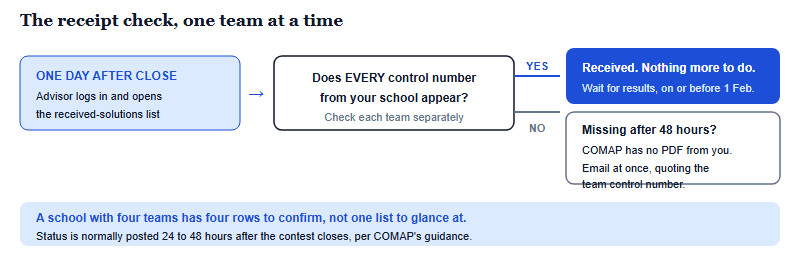
Most HiMCM teams treat the upload as the finish line. Per COMAP’s Procedures and Tips article (V20251027), two things still have to happen after it: the students and the advisor sign a team control sheet declaring they did not work outside the window, and somebody logs back in to verify COMAP actually received the file. If it is not listed within 48 hours, COMAP did not get it.
Submitting is a handoff, not an ending
The asymmetry here is worth naming early. Fourteen days of work produce a single PDF — the entire deliverable in a contest that rewards a defensible model rather than a correct answer — and that PDF travels through a submission form, a server and a status list before any judge opens it. Every link in that chain is somebody’s responsibility, and none of them is automatic in the sense that students usually assume. A team that stops paying attention at the moment the upload progress bar completes has left the last two links unattended.
There is nothing dramatic about any of it. The steps are short, and mostly consist of checking a number against a screen. But they are the only steps in the entire contest where a purely clerical mistake can cost a team its entire fortnight of modelling, which is a poor trade for the five minutes they take.
| Stage | When | Who does it | What confirms it happened |
|---|---|---|---|
| Upload the solution PDF | Any time up to the solution deadline | Any team member or the advisor | The submission form completes |
| Sign the team control sheet | After the team has submitted | Students and advisor together | A signed declaration held by the team |
| Verify the solution was received | From one day after the contest closes | Advisor, via Advisor Login | Your team appears in the received-solutions list |
| Escalate if it is missing | If absent more than 48 hours after close | Advisor or team | Email to COMAP quoting the control number |
| Judging | Completed in January | COMAP judges | Nothing visible to teams during this period |
| Results published | On or before 1 February | COMAP | Results posted; certificates become downloadable |
What the submission form asks for
COMAP states that each team submits an Adobe PDF copy of its solution through an online submission page, and that either a team member or the advisor may do it. The form needs three pieces of information: your team’s control number, the advisor ID number and your problem choice. Only the first of those is usually written on the paper itself, which is the practical argument for having all three in one place before the final evening rather than hunting for the advisor ID at the deadline.
A few submission constraints are easy to trip over under time pressure, and COMAP states them plainly:
- One team PDF per online submission. COMAP limits submissions to one team solution each.
- The attachment must be under 20MB. Image-heavy papers can exceed this, which is a reason to check the file size before the last hour rather than during it.
- Name the file with the control number — COMAP gives 1234.pdf as the example — and check the digits, since transposing them is a known and recurring error.
- The summary belongs inside the PDF as its first page, not as a separate file.
- Do not attach anything else — with one exception. COMAP states that parental or guardian authorisation forms, programs and software should not be included, as they will not be used in judging. The exception is AI use: per COMAP’s Procedures and Tips article (V20251027), a team that uses AI tools must follow COMAP’s AI use policy, which produces an additional report to be added to the end of the PDF and which does not count towards the page limit. Confirm the current policy wording on comap.org before you submit.
That last point also settles a question teams ask every year about paperwork. COMAP states that parental and guardian authorisation forms are no longer required to be sent, that this step is now part of registration, and that advisors should simply keep a copy for their own records.
The control sheet is a declaration, not a formality
This is the step most teams have never heard of. COMAP states that once a team has submitted its solution report, “the students and team advisor must sign the team control sheet stating that they did not work outside the 14-day window or violate any of the contest rules.”
Read carefully, that sentence does two jobs. It closes the contest window with an explicit, signed statement rather than an assumption, and it puts the advisor’s signature next to the students’. The advisor is the person COMAP relies on to verify that teams stop working at the end of the window, so the signature is the formal record of a duty they have held all fortnight.
It also connects to the conduct rules in a way worth understanding before you sign anything. The declaration covers both working outside the fourteen days and violating any other contest rule — which includes the prohibition on seeking help from anyone outside the team, the advisor included, and the ban on sharing any part of the problem or your work during the contest. A team that has been careless with a group chat is not merely hoping nobody noticed; it is being asked to sign a statement about it.
The practical implication for a team in September is simply that the fortnight should be run in a way that makes the declaration easy to sign. Keep the work inside the window, keep the conversation inside the team, keep a source log, and the last administrative step of the contest is uneventful.
The 48-hour receipt check
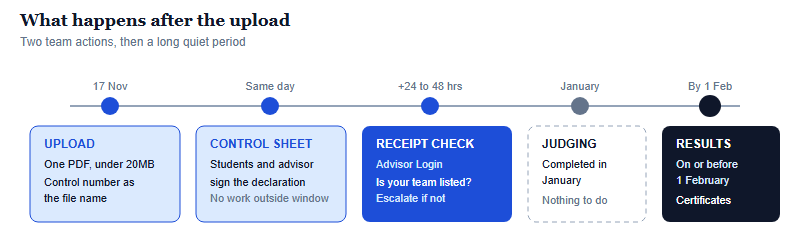
This is the single most valuable habit in this article, and it takes about two minutes. COMAP recommends that one day after the contest has closed, advisors log in to the contest website using the Advisor Login link to verify that each team’s electronic solution was received. It states that in most cases solution status is posted 24 to 48 hours after the contest is over.
Then comes the sentence that makes the check worth doing: if after 48 hours your team’s solution is not listed among the received solutions, COMAP did not receive a PDF submission from your team. The instruction in that case is to make contact as soon as possible by email, quoting your team control number.
Notice what this means for a school running several teams. The check is per team, not per school. An advisor with four teams has four rows to find in that list, and it is entirely possible for three uploads to have gone through and one to have failed silently. Reading the list quickly and concluding “we’re there’” is not the same as confirming every control number appears.
Two scheduling points make this concrete for teams in China. The window closes on 17 November 2026, so the check lands in the following few days — and the timings COMAP quotes are relative to the close of the contest, which runs on the organiser’s schedule rather than on Beijing local time. Put a calendar reminder on the advisor’s phone for the day after the close, and confirm the exact closing time on comap.org rather than assuming it matches a Chinese date boundary.
The wait, and what the result will and will not be
After the receipt check there is a genuinely long quiet stretch. COMAP states that contest judging will be completed in January and that results will be posted on or before 1 February each year. Nothing is required from teams during that period, and nothing about a paper can be changed.
Per COMAP’s guidance, successful solution papers are recognised in the categories Outstanding, Finalist, Meritorious, Honorable Mention and Successful Participant, while papers that do not adequately address the problem or that violate contest rules are designated Unsuccessful or Disqualified. One further policy is worth knowing before results appear: COMAP states it will not rejudge contest papers, that all papers go through a rigorous judging process, and that it stands behind the designations awarded. There is no appeal route, which is another argument for making sure the paper that arrives is the one you meant to send.
When results are published, COMAP states that PDF certificates become available for download — printing the names exactly as the advisor entered them at registration. It also recommends reviewing the Outstanding papers and reading the judges’ commentary afterwards for insight into the content and presentation of the strongest work. That is the right way to use them: study how a strong team organised its assumptions, its sensitivity analysis and its conclusions. Copying a model, prose, figures, code or citations from any paper is plagiarism that ends a team’s contest, and COMAP compares submissions against one another precisely to detect it.
Using the gap between November and February well
Two and a half months of silence is an odd thing to plan around, but it is useful time if you treat the paper as finished work to learn from rather than a lottery ticket to check on.
The most valuable exercise is a debrief while the fortnight is still fresh — ideally in the week after submission. Where did the model change, and what forced the change? Which assumption turned out to be doing the most work? Where did the writing lag the modelling? Those answers are worth more than the eventual category, because they are the things a team can act on next year, and because they describe what actually happened rather than what a judge concluded. This is also where the contest’s real character shows: HiMCM asks you to build and defend a model rather than find a correct answer, so the honest post-mortem is a continuation of the exercise, not an epilogue to it.
The February timing also has a straightforward implication for applicants. Results arriving on or before 1 February land after many application deadlines have already passed, so a HiMCM result from the November window may or may not be available in time depending on where and when a student applies. Where it is available, its value inside an application comes from corroboration: an admissions reader looks at an award alongside the transcript, the course choices and the essays, and a modelling result reads as credible when the rest of the file points the same way. Treat the debrief notes as the raw material for describing the work honestly, and check each university’s own deadlines rather than assuming a result will arrive in time.
Frequently asked questions
How do we know COMAP received our paper?
Log in via Advisor Login from one day after the contest closes. COMAP normally posts solution status 24 to 48 hours after the close.
What if our team is not on the received list?
COMAP states that if you are not listed after 48 hours it did not receive your PDF. Email COMAP at once with your control number.
Who signs the team control sheet?
The students and the team advisor, after submitting, declaring they did not work outside the 14-day window or break contest rules.
Can a result be appealed or re-judged?
No. COMAP states it will not rejudge contest papers and stands behind the designations awarded to papers.
This is an independent guide operated by Hanlin Education for China-based international-school students. We are not affiliated with, endorsed by, or sponsored by COMAP or the High School Mathematical Contest in Modeling. Submission procedures, verification steps, judging timelines and award designations are set by COMAP — the descriptions here follow COMAP’s Procedures and Tips article (V20251027), which accompanies but does not replace the official rules, so confirm current details on comap.org before acting on anything here. Factual errors are corrected within 7 working days of notice.