
For many high school teams preparing for the High School Mathematical Contest in Modeling (HiMCM), the focus is often entirely on mathematical modeling techniques, coding proficiency, and English writing skills. However, a critical administrative component frequently overlooked until the final hours of the competition is the HiMCM advisor ID. In the 2026 season, with the introduction of a new online submission workflow, this identifier has become a hard gatekeeper for entry acceptance.
What Is the HiMCM Advisor ID?
The HiMCM advisor ID is a unique alphanumeric code assigned to the supervising teacher or advisor registered for a team. According to COMAP’s updated guidelines for the 2026 season, every team must submit their solution via a specific online form. This form requires three key pieces of information to validate the submission: the Team Control Number, the selected Problem (A or B), and the Advisor ID.
The Advisor ID is a mandatory field in the online submission form. Without entering this code alongside the Team Control Number, the submission process cannot be completed. The 2026 rules specify this online form as the required channel for submitting solutions.
How Advisors Obtain Their ID
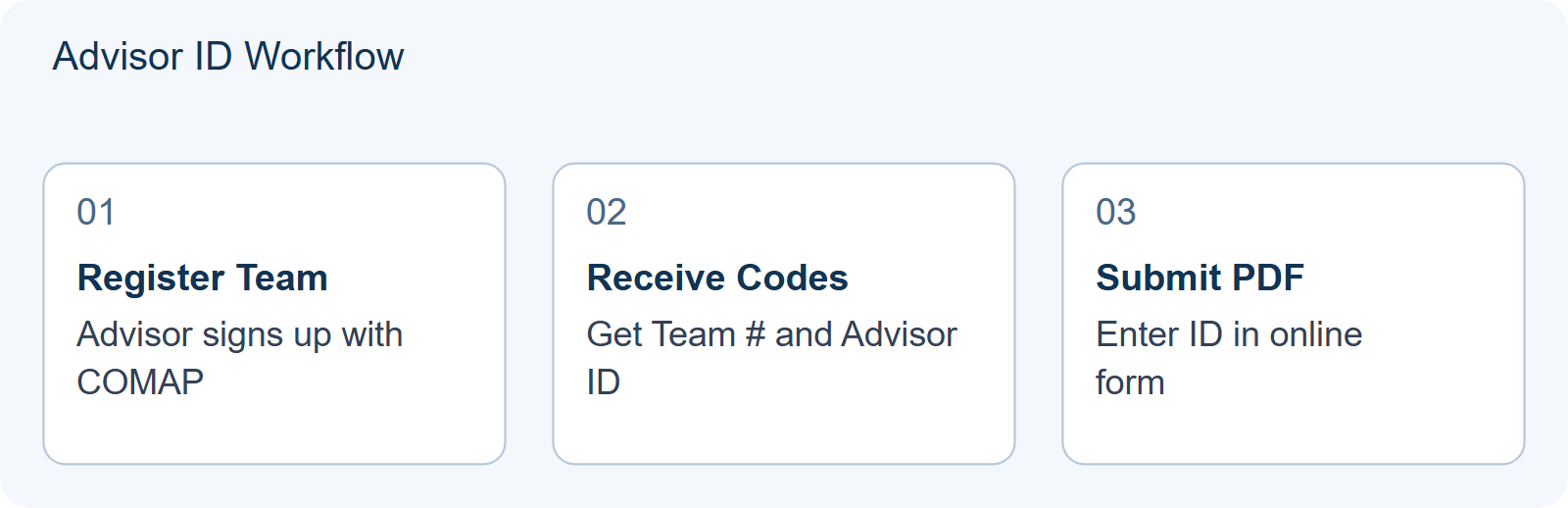
The process begins during the registration phase, which typically opens in September for the November competition. The advisor must register themselves and their team through the official COMAP channels. Once the registration is processed, the system generates the necessary credentials.
- Registration: The advisor creates an account or logs into an existing one to register the team members (1-4 students from the same institution).
- Assignment: Upon successful registration, the Advisor ID is issued. It is distinct from the Team Control Number.
- Verification: Advisors should immediately record this ID alongside the Team Control Number. Unlike previous years where physical forms might have been used, the 2026 digital workflow relies heavily on these codes for authentication.
It is crucial to note that the advisor does not need to be present at the computer when the file is uploaded. Any team member can perform the upload, provided they have access to the correct Advisor ID and Team Control Number. This flexibility allows students to manage the final submission logistics even if the advisor is unavailable at the exact moment of upload.
Why Submission Fails Without It
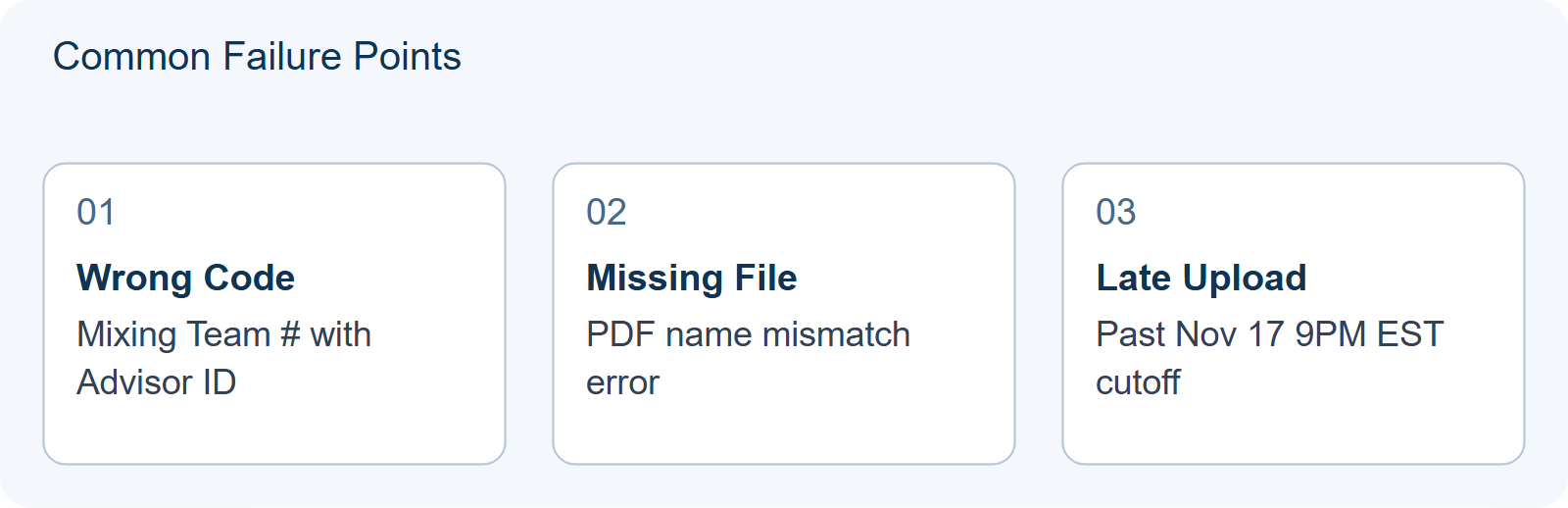
The most common cause of late-season panic is the inability to locate the Advisor ID. If a team attempts to upload their 25-page PDF solution without entering the correct Advisor ID, the submission fails. Since the deadline is strict—November 17, 2026, at 9:00 PM EST—there is no grace period for administrative errors.
| Submission Component | Required For | Source of Information |
|---|---|---|
| Team Control Number | Identifying the specific team entry | Issued upon team registration |
| Advisor ID | Validating the supervising authority | Issued to the registered advisor |
| Problem Selection | Routing to correct judging panel | Chosen by team (A or B) |
Teams must ensure that the name of the PDF file matches the Team Control Number exactly (e.g., 1234.pdf). While the filename uses the Team Control Number, the form fields require both numbers. Confusing the two is a frequent error. The Advisor ID is strictly for the form field, while the Team Control Number is for the filename and identification.
Preparation Checklist for Teams
To avoid last-minute failures, Hanlin recommends integrating administrative checks into your pre-competition routine. Do not wait until November 17 to verify these codes.
- Registration Check: Immediately upon successful registration, save the Advisor ID and Team Control Number in a shared document accessible to all team members.
- Dry Run: Before the competition window opens, test the login process. Ensure the advisor can access their dashboard to view the IDs.
- Backup Plan: Have a second student memorize or store the codes in case the primary uploader loses internet connectivity or device access.
- File Naming Convention: Agree on the file naming format early. Remember, the file name uses the Team Control Number, not the Advisor ID.
For more detailed strategies on managing the submission timeline, refer to our guide on After You Upload: The HiMCM Control Sheet. Additionally, understanding the broader context of team composition can help prevent registration issues; see Can a HiMCM Team Include Students From Different Schools? for rules on institutional affiliation.
Finally, as you prepare your technical tools, ensure your team is ready for the digital environment. Our article on The HiMCM Toolchain provides insights into software standardization that complements your administrative readiness.
HYPOTHETICAL/ILLUSTRATIVE: The “Shared Drive” vs. “Personal Note” Decision
Consider a hypothetical scenario involving Team Alpha, a four-student group preparing for the HiMCM season. Their advisor, Mr. Henderson, successfully registers the team in September and receives his unique Advisor ID. The critical decision point arises immediately after registration: How should this sensitive administrative credential be stored and accessed by students during the intense final hours of the competition? Two plausible approaches emerge, each with distinct risks and benefits that directly impact submission success.
Choice A: The Personal Note Method. In this approach, Mr. Henderson emails the Advisor ID to one designated student leader, who saves it in their personal phone notes or a private cloud folder. The rationale is simplicity; only one person needs to handle the upload, reducing confusion about who has the code. However, this creates a single point of failure. If that student’s device crashes, loses internet connectivity, or if they accidentally delete the note while organizing files, the entire team is locked out. During the dry run mentioned in the article, Team Alpha discovers that the student leader cannot access the email due to spam filters, causing panic three days before the deadline.
Choice B: The Shared Drive Audit. Alternatively, Mr. Henderson places the Advisor ID and Team Control Number into a read-only PDF document titled “Submission Credentials.” This file is uploaded to a shared school drive accessible by all four team members. Each student downloads a local copy to their laptop and backs it up on a USB stick. This method decentralizes access. If Student A’s computer fails, Student B can immediately initiate the upload using their own verified copy of the credentials. The cost is slightly higher initial effort to set up permissions and ensure everyone knows where the file lives, but the resilience is significantly greater.
The decision changes based on redundancy versus convenience. Choice A prioritizes ease of distribution but ignores hardware reliability. Choice B prioritizes system robustness at the expense of minor setup friction. For a high-stakes contest with no grace period for administrative errors, redundancy is paramount. The article’s advice to “save codes in a shared document” aligns with Choice B, but the illustrative example highlights why this matters: it transforms the Advisor ID from a fragile secret into a distributed asset.
To apply this logic, teams should perform a Reusability Self-Check two weeks before the competition:
- Access Test: Can every team member independently retrieve the Advisor ID without asking the advisor?
- Device Failure Simulation: If your primary uploader’s laptop dies, does another member have the exact same credentials ready to go?
- Version Control: Is there only one source of truth for these numbers, preventing conflicting versions (e.g., an old draft vs. the final ID)?
| Criterion | Personal Note (Choice A) | Shared Drive (Choice B) |
|---|---|---|
| Setup Effort | Low | Medium |
| Failure Risk | High (Single Point) | Low (Redundant) |
| Upload Speed | Fast if device works | Consistent across devices |
This illustrative comparison underscores that securing the Advisor ID is not just about obtaining it, but about engineering its availability. By choosing decentralized storage, teams eliminate the most common cause of late-season administrative panic, ensuring that technical modeling skills are not wasted due to a missing alphanumeric string.
Frequently Asked Questions
Can a student submit the paper without the advisor?
Yes. Any team member can upload the PDF using the Team Control Number and Advisor ID. The advisor does not need to be physically present or logged in at the time of submission.
What if I lose my Advisor ID?
Advisors should refer to their original registration confirmation email or records where the ID was issued. It is recommended to store this code in a shared cloud document with the Team Control Number immediately after registration.
Does the Advisor ID change every year?
The ID is tied to the specific team registration for that season. Even if the same advisor registers a new team next year, a new Team Control Number and associated validation codes will be generated for that specific entry.